Showing posts with label Utilities. Show all posts

Tuesday, August 29, 2017

Wise Care 365 Pro Portable


Wise Care 365 is a bundle of important registry, disk, and other system utilities for your PC. Easy to use and effective, Wise Care 365 is the best solution to improve your PC's performance. Get Wise Care 365 and your computer will never run slow again!

What can Wise Care 365 do?
• Clean up, defragment and optimize the Windows Registry
• Defragment and free up space on your hard disk
• Protect your privacy by erasing personal tracking data
• Recover lost files
• Hide important files or folders
• Prevent unauthorized use of personal applications
• Auto shut down your PC
• Free up Memory to boost game and enterprise software performance
• Simple "One Click Tune-up" option will optimize your PC

Why choose Wise Care 365?
An all-in-one utility
Wise Care 365 includes both Wise Disk Cleaner and Wise Registry Cleaner. However, with other attractive and exciting features, it is far more than just that. Wise Care 365 will keep your PC in tiptop shape and running at peak performance!

Able to find more hidden problems than any other similar programs.
Wise Care 365 can detect more hidden invalid registry issues than other similar programs, which is accredited by CHIP and PCWorld.

Simpler and easier to use
It takes just one click to use Wise Care 365. As if by magic, your old PC will transform into a brand new and blazing fast one after Wise Care 365's automatic cleanup and tune-up.

Now with the fastest scanning speed
The scanning speed of Wise Care 365 is twice as fast as CCleaner’s, as well as Advanced System Care Pro 5.

Highly reviewed by professionals and users
All the features in Wise Care 365 got highly reviewed by PCWorld, PCAdvisor, ComputerBild, CHIP, CNET, ZDNet, and so on.

Highly experienced developers
A group of top programmers, all of whom have at least ten-years experience, spent three years creating Wise Care 365 after collecting an abundance of feedback from users..


-----

Saturday, August 26, 2017

IDM UltraCompare Portable


UltraCompare v16 gives you the ability to rapidly compare 2 or 3 files from multiple locations at once, and merge conflicts and differences visually.

Text Compare Features:
  • Powerful 3-way text compare
  • Shell Integration (right click menu in Windows Explorer)
  • Ability to edit line and merge within UltraCompare
  • Copy/paste multiple selected contiguous lines to clipboard
  • Copy frame to clipboard
  • Ability to see whitespace differences (tabs and spaces)
  • Set Tab value to a specific number of spaces (like UltraEdit-32/UEStudio)
  • Bookmark support
  • Ability to delete lines from file
  • Line-by-line comparison of individual files
  • Status bar shows number of lines/blocks with differences
Difference Summary includes:
  • Data in source but not in destination file (or vice versa)
  • Character differences between files on the same line
  • Command Line Support
Ignore options:
  • Ignore case
  • Ignore spaces
  • Ignore blank lines
  • Line terminator differences
  • Lines which begin with...
  • Lines which contain..
  • Lines which end with...
  • A defined number of lines at the beginning of file
  • A defined number of lines at the end of file
  • EBCDIC compare supported
  • Double-byte compare supported
Folder Compare Features:
  • 3 Way Folder Compare
  • ZIP Archive Compare
  • ZIP file password support
  • Support for RAR compressed files
  • Side-by-side Compare Presentation
  • Shell Integration
  • Split screen to preview text in one pane while moving from file to file
  • Option to compare files just on the basis of time/date/size
  • Ability to set a NOT operator for filter, ie, NOT *.bak, etc.
  • Provide live update on progress (useful when working with large nestedtrees)
  • Favorite files and folders now allows quick access to commonly used items
  • Explore source or destination folder by right click in folder mode
  • Compare individual directories
  • Recursive compare of directories (includes subdirectories)
Difference Summary includes:
  • Same named files with different sizes
  • Same named files with different creation dates/times
  • File type: Binary or ASCII
  • Compare two folder structures and indicate which files have different permissions
  • Ability to select files with different names and compare them
  • Ability to right-click on column headings and select fields
Word Compare Features:
  • Compare Microsoft Word documents
  • Compare RTF Files
Fast Binary Compare Features:
  • Binary comparison allowing for shifted data
  • Command Line invocation
  • Option to display decimal offset rather than Hexadecimal
Merge Features:
  • Undo merge feature
  • Merge compared lines/blocks between files for 2 and 3 way compare
  • Merge compared files between directories for 2 and 3 way folder compare
  • Selected line merge capability
  • Accept all (or Merge All) button for text mode, and folder mode
  • Word-level (or selection-level) replacement and insertion
  • Mark merged lines for review
  • Enhanced merging - allows changes to be added to changes in other file
  • Merge contents of compared directories
  • Option to automatically move to the first difference when loading
  • Option to automatically move to next difference after merge
Print/Output Features:
  • Ability to use UC in batch files to produce reports, side-by-side difference output
  • Print right/left file from File menu
  • Print difference summary showing matching lines or differences only
  • Print and save differences in context
  • Print and save differences of one file
  • Print and save files side by side
  • Print and save differences from binary compare
File Management Features:
  • FTP support
  • Open Left/Right File independently
  • Drag and drop from Explorer
  • Close All in the file menu and as a button
  • Automatic file change detection
Display Features:
  • Integrated IE Browser Support - Display your HTML files as they would appear in the browser
  • Show File in Browser
  • Text Relational Lines Mode
  • Full width display of active line of each file at bottom of application
  • Ability to word wrap files
  • Graphical scrolling display to easily locate changes
  • Synchronized horizontal scroll
  • Flip frames to switch source/destination files/directories
  • Toolbar customization
Miscellaneous Features:
  • User Profiles for allowing different settings for different modes
  • Set UltraCompare to single instance
  • Check for updates
  • Set Filter to specify file types to be displayed during Folder compare
  • Configurable Key mapping
  • Set font for compare panes
  • Customize/Manage toolbar/menu
  • Command line option for quick difference check
-----

32bit version can be installed and used on 64bit systems.

Monday, August 21, 2017

Glary Utilities Pro Portable

GlaryUtilitiesPortable_5.78_Rev1.paf.exe


Glary Utilities is an indispensable friend for your PC, with its 100% safe, thorough & quick cleaning and worry-free restoration. Glary Utilities is a freeware with registry and disk cleaning, privacy protection, performance accelerator and amazing multifunctional tools. It can fix dogged registry errors, wipe off clutters, optimize internet speed, safeguard confidential files and maintain maximum performance. It is designed for both novice and professionals.

User-friendly interface shows clear & detailed directions. For novice, all work can be done with just 1 or 2 clicks, while for professionals, abundant options are available. Glary Utilities Pro provides automatic PC care at a scheduled time in the background for users.
  • The #1 free, powerful and all-in-one utility for cleaning your PC
  • Boosts PC speed and repairs frustrating errors, crashes and freezes
  • Features one-click functionality and easy, automated options
  • Over 20 tools to maximize the performance of your computer
-----

More Info:
http://www.glarysoft.com/

Download:


Thursday, August 17, 2017

Air Explorer Pro Portable


Air Explorer is a software to manage all your multiple cloud drives.


Air Explorer works with:
OneDrive, OneDrive for Business, Google Drive, Amazon Cloud Drive, 4shared, Box, Mega, Dropbox, Mediafire, Yandex, Baidu,Hidrive, pCloud, Mail.ru WebDav and FTP.

Multiply your storage space by joining all your clouds
- Copy/Paste between cloud servers
- Pause and continue uploads and downloads
- Air Exlorer can share files
- Centralize search of your files across all the clouds

Cloud file explorer easy to use
- Application available for Windows
- Thumbnail view of your pictures
- Drag'n drop files between your computer and the clouds

-----

Requires XP or higher
Requires .NET Framework 3.5 or higher

More Info:

http://www.airexplorer.net/en/index.php

Wednesday, August 16, 2017

Tweaking.com - Windows Repair Portable


Tweaking.com Windows Repair is an all-in-one repair tool to help fix a large majority of known Windows problems including registry errors and file permissions as well as issues with Internet Explorer, Windows Update, Windows Firewall and more. Malware and installed programs can modify your default settings. With Windows Repair you can restore Windows original settings.
  • Reset Registry Permissions
  • Reset File Permissions
  • Register System Files
  • Repair WMI
  • Repair Windows Firewall
  • Repair Internet Explorer
  • Repair MDAC & MS Jet
  • Repair Hosts File
  • Remove Policies Set By Infections
  • Repair Icons
  • Repair Winsock & DNS Cache
  • Remove Temp Files
  • Repair Proxy Settings
  • Unhide Non-System Files
  • Repair Windows Updates
  • and more...
-----

Thanks to The Hidden 2000 / AoRE for the medicine.


Added download for Free version.


More Info:
http://www.tweaking.com/content/page/windows_repair_all_in_one.html

Download:

Choose Free or Pro version
 

Wise Folder Hider Portable


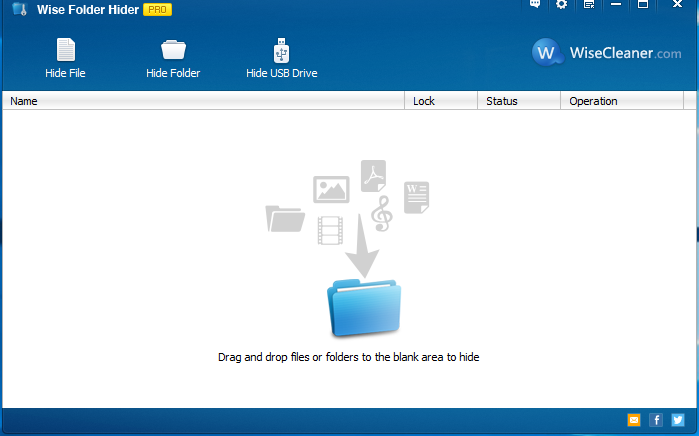
Hide private files, photos, videos and other personal data from your PC.

Wise Folder Hider protects your private and important data from others’ eyes. This application is designed as a free USB drive/ file/ folder hiding tool. User can use it to hide sensitive or important files and folders on local partitions or removable devices. The data can’t be accessed by other programs or other operating systems such as DOS. The only way to access or unhide these data is to enter the valid password. However, Wise Folder Hider is designed for home use only, but not recommended for commercial settings which require stricter confidentiality. Using this application, your private data and important files will not be exposed to others or unintentionally revealed and your privacy will not be pried into if you share one computer, USB drive, removable HDD drive, etc.

Advanced Encryption Algorithm Protects Your Private Data from Priers
Wise Folder Hider Pro adopts advanced encryption algorithm, providing much more enhanced security than the free version for files and folders on your Windows PC. Wise Folder Hider Pro defends your private files from being found/read by a third-party tool.

Second Password Makes Your Hidden Files & Folders Double Secure
Wise Folder Hider Pro offers users an optional higher level of security. Users can set a second password for each of the files and folders hidden by Wise Folder Hider Pro. For those who have some real confidential files, they can rest assured knowing that their hidden files are double secured.

More Secure and Convenient to Modify protected files:
Different from other folder hiders, when it comes to modifying a hidden file or folder, users don’t have to unhide it, edit it, and then hide it again. A single click of the ‘Open’ button will open the hidden file or folder, so it becomes visible to you. Then you can edit or modify it like it has been unhidden. When you are done editing, close the program and the file or folder will become hidden again automatically, saving you extra steps. This amazing feature comes in handy when you hide some files that you use or edit frequently.

Context Menu Option & Super User-friendly Interface
The interface of Wise Folder Hider Pro is very intuitive. Even a first timer can get the hang of it in a minute. Better yet, while installing this program, an item called ‘Hide File/Folder with Wise Folder Hider’ is automatically added to the context menu. Users can hide files or folders by right-clicking them without launching Wise Folder Hider Pro.

Tuesday, August 15, 2017

FileLocator Pro Portable


FileLocator Pro offers the most affordable way to exhaustively search your computer for all your important data. FileLocator Pro offers unique advanced features for digging out information in even the most obscure file formats. Find out why many Windows XP users are switching to FileLocator Pro today!

Whether it's a line of source code, an entry in a log file, a legal brief, or even just a Christmas letter to your family, FileLocator Pro helps you find things fast. Its unique features make it possible to dig out information in even the most obscure file formats.

Features:
  • Search using Boolean or Regular Expressions
  • Dual/Quad core processor support
  • Word, Excel and PDF searching
  • Open Office, Word Perfect searching through IFilter support
  • LAN/WAN network drives searching (UNC support)
  • Export search results in Text, CSV, HTML, XML, or a customized format using XSLT
  • ZIP, RAR, CAB, 7-Zip, ARJ, Bzip, CHM, CPIO, DEB, GZIP, ISO, LZH, NSIS, TAR archive searching
  • Active Scripting support for the ultimate in search customization
  • Shows surrounding lines of text
  • Customizable search environment
  • Built-in file viewer
  • Launch 3rd party editor at found line (inc. VS.NET)
  • Drag and drop support
  • Print preview
  • Search navigation to quickly browse previous search results
  • Integrates into Windows Shell
-----

Credits to PortableWares (Fuken Gruven) for original installer.


More Info:

Sunday, August 13, 2017

PilotEdit Portable


PilotEdit  is a capable text file editor that will easily edit large files.

PilotEdit supports the following file types; C, C++ Files, Java Files, HTML Files, XML Files, Oracle SQL Files, UNIX/Linux, Shell Files, JSP, TCL/TK Files, BAT files, PilotEdit Script, Javascript Files, PHP, ASP, Assembly, ASP.NET, CSS, Visual Basic, Perl, C#, Python, Ruby, XHTML Files, COBOL, AHK, Cript, Inno Setup Script, AutoIt Script, Pascal, CSV, Apache Pig Latin Script, VC++ Resource Files, Groovy, and REXX.

Features:

  • Edit huge files larger than 400GB (40 billion lines).
  • Compare and merge two huge files larger than 100GB (10 billion lines).
  • Code collapse.
  • Self-defined file types and key words high-lightening.
  • Input, delete, cut, copy and paste in HEX mode.
  • Column mode and Word wrap.
  • Endless undo/redo even after you switching between text mode and HEX mode.
  • Edit, download and upload huge FTP files.
  • Find/replace multiple-line text directly through regular expression.
  • Compare two directories.
  • Add a pre-defined string from string table by just one click.
  • Regular expression and multiple-line text support.
  • Define the frequently used regular expressions in script files and process files automatically.
  • File group enable you to open multiple files by just one click.
  • Find/replace in multiple directories.
  • Sort.
  • Find/remove duplicate lines.
  • Extract Strings by copying the target strings matching the regular expression into clipboard.
  • Text Formatting.
  • Edit, download and upload large files through SFTP.
  • Open huge files in quick mode.
  • Replace millions of strings in a huge file in quick mode.
  • Support UNICODE files and DOS/UNIX files.
  • Search in zip files.
  • Regular expression generator.
-----

More Info:
http://www.pilotedit.com

Download:

Thursday, August 10, 2017

WinToHDD Portable


Install, Reinstall, Clone Windows 10/8.1/8/7/vista without using a CD/DVD or USB drive!

  • • Reinstall Windows directly from ISO, WIM, ESD without using CD/DVD/USB.
  • • Install Windows onto a second hard drive directly from ISO, WIM, ESD without using CD/DVD/USB.
  • • Fully Compatible with GPT/UEFI.

-----


WinToUSB Portable


 WinToUSB is the best Windows To Go Maker that allows you to install and run Windows operating system on a USB hard drive or USB flash drive, using an ISO image or CD/DVD drive as the source of installation. Starting from version 2.0, you can clone current Windows OS installation (Windows 7 or later) to a USB drive as a Windows To Go Workspace. WinToUSB also supports creating a bootable WinPE USB drive, it can help you transfer the contents of WinPE to a USB drive and make the drive bootable.


WinToUSB's key features include
• Easy-to-use wizard interface that provides step-by-step instructions for creating a Windows To Go USB drive.
• Creation of Windows To Go from an ISO image file or CD/DVD drive.
• Clone an existing Windows OS (Windows 7 or later) to a USB Drive as a Windows To Go Workspace.
• Use of a Non-Enterprise Edition of Windows 10/8.1/8/7 to create Windows To Go Workspace.
• Creation of Windows To Go on Non•Certified Windows To Go USB Drive.

Extra features of the Enterprise Edition
• Clone current Windows OS (Enterprise edition of Windows 10/8.1/8/7) to a USB drive as a Windows To Go Workspace
• Clone current Windows OS which on a dynamic disk to a USB drive as a Windows To Go Workspace
• Clone current Windows OS which on a USB disk (Windows To Go USB drive) to other USB drives as a Windows To Go Workspace

Important notes
• Windows 7 is not completely portable. You may have driver problems when booting on different computers, so highly recommend using Windows 10/8.1/8 to create portable Windows.
• Windows 7 does not have built•in USB 3.0 support, so Windows 7 will have to be booted from a USB 2.0 port.
• The common USB flash drives are very slow. It takes a long time to install and run Windows from a common USB flash drive, highly recommend using a USB hard disk, a Windows To Go Certified Drives or a SanDisk Extreme CZ80 USB 3.0 Flash Drive to create portable Windows.
• Windows To Go drives can be booted on different computers, so you can carry it to anywhere and use it on any computer.
• You need to be an administrator on the computer you are installing the WinToUSB on.


Version 3.7 (8/8/2017)

    Add support for cloning Windows Embedded Standard 7 to USB drive
    Fixed bug: Failed to clone Windows which is on a VHD/VHDX disk
    Support for the latest version of Windows 10
    Dutch language support
    Fix other minor bugs


-----

Tuesday, August 8, 2017

Advanced SystemCare Pro Portable

Advanced SystemCare Pro 10.3.0.745 Multilingual Portable


Advanced SystemCare The World’s Top System Utility for Superior PC Health. Advanced SystemCare PRO provides an always-on, automated, all-in-one PC Healthcare Service with anti-spyware, privacy protection, performance tune-ups, and system cleaning capabilities.

Optimizing & Cleaning Powerfully and Securely
- Boosts your Registry, system, and Internet for top performance
- Optimizes, cleans, and fixes a variety of PC problems with just 1 click
- Detects and removes spyware, adware and other malware
- Trusted by 150 million users worldwide

Protection
- Basic Protection from Security Threats
- Enhanced Malware Protection
- Surf and Search the Web Safely

Performance
- Basic System Optimization
- Ultimate System Tuneup for Top Performance
- Up to 300% Internet Speedup with Internet Booster
- Real-time Optimization with Active Optimize
- Deep Windows Registry Clean
- Maximum Hard Drive Performance
- Over 20 Smart Tools for Daily PC Maintenance

Privacy
- Auto Clean for Privacy Security Whenever You Log on
- Block Malicious Attempts to Access Your Personal Data

What's New in Advanced SystemCare Pro 10:
+ New FaceID - Automatically catches intruders who are secretly accessing your PC and prying into your privacy with new facial recognition technology.
+ No Annoying Ads and Safer Surfing - Removes various online ads and blocks more malicious websites with the larger online database, supporting Google Chrome, Mozilla Firefox, and Internet Explorer.
+ Faster Startup - Optimizes startup items to shorten boot time with new Startup Optimization in Clean & Optimize.
+ Smoother PC - New Resource Manager in Performance Monitor provides an easy way to check the processes taking high RAM/CPU/disk usage in real-time.
+ No Malicious Modification - Redesigned Homepage Protection shields homepage and search engine against malicious modifications.
+ No Privacy Leak - Enhanced Privacy Sweep supports cleaning more programs and Windows apps and secures your privacy.
+ Improved Junk Files Clean - Added cleaning for installed driver packages to free up more disk space.
+ Always Up-to-date Software - Enhanced Software Updater supports to update more popular programs.
+ More Powerful Uninstall - Supported uninstalling more stubborn programs & browser toolbars and removing more malicious & ad-based plug-ins with new IObit Uninstaller 6.
+ Larger Database - Expanded database of Spyware Removal, Real-time Protector, and Registry Fix for a more secure PC.
+ Better Experience - Brand new intuitive UI and decent support for high DPI displays & high resolution screens.
* Supported 36 languages.
* And more can be discovered by you.


-----

Monday, August 7, 2017

Process Lasso Pro Portable


Process Lasso is a tool designed to manage and edit how your processes and services run.

It offers a robust list of capabilities including default process priorities and affinities, termination of disallowed processes, instance count limits, a system responsiveness graph, logging of processes, keep select processes running (auto-restart), and much more.
  • ProBalance dynamic priority optimization
  • Persistent (sticky) priorities and CPU affinities
  • Instance count limits
  • Disallowed processes
  • Keep processes running (auto-restart)
  • Unique system responsiveness graph
  • Prevent PC sleep for designated processes
  • Differentiate between svchost.exe instances
  • Extremely low resource use
  • Stand-alone process management engine (uses as little as 1MB of RAM)
  • Event logging
-----

32bit version can be installed and used on 64bit systems.

More Info:
https://www.bitsum.com/


Sunday, August 6, 2017

UltraISO Portable


UltraISO  is an ISO CD/DVD image file creating/editing/converting tool and a bootable CD/DVD maker , it can directly edit the CD/DVD image file and extract files and folders from it, as well as directly make ISO files from your CD/DVD-ROM or  hard disk. At the same time, you can maintain the ISO bootable information, thus creating your own bootable CD/DVDs. You now have the power to make and  edit your own ISO files, and then burn them to CD/DVD for your own needs.

Download: 

Rev1: Added drivers to mount virtual drives properly.

UltraISOPortable_9.7.0_Rev1.paf.exe

Friday, August 4, 2017

Directory List & Print Pro Portable

Directory List & Print Pro is a software for Windows and enables to list and print folder and directory contents in a most simplest way. Furthermore, the file and folder lists can be formatted, filtered and saved to several file formats as well as be further processed (delete/copy/move files). By copying the directory content to the clipboard the list of files and folders can be exported into other programs or opened directly in Word™ and Excel™ and displayed as text file, PDF file, HTML and XML table.

Numerous selection functions and filter possibilities (meta tags as EXIF, IPTC, AUDIO, VIDEO, DOCUMENT) allow to create simply and fast your requested folder listings, list of MP3 files as well as your list of video files and output them in the requested format. Directory List & Print Pro is also a very helpful tool for computer forensics.

Features:
  • Display of column titles in the first row, turn on/off.
  • Display of intertitles (directory path), turn on/off.
  • Print directory listing, direct printing of corresponding list.
  • Export list into other programs by copying to the clipboard.
  • Open the list directly in Microsoft Word and Excel.
  • Support for connecting and disconnecting network drives.
  • Automatic saving of display options when exiting the program.
  • Start program with a directory path as a parameter.
  • Selection of starting directory by an Explorer like tree structure.
  • Selection of starting directory by entering the path as a text string.
-----

Thanks to RadiXX11 for the patch.

Credits to Dave Green for combining installers and adding language menu.

Wednesday, August 2, 2017

CPUBalance Portable


CPUBalance is a lightweight tool that uses the company’s ProBalance technology to monitor and prevent running processes from hogging the processor, in order to improve the system’s response time. This application can be run standalone or along with Process Lasso, enhancing its existing ProBalance feature.

-----


32bit version can be installed and used on 64bit systems.

IDM UEStudio Portable


UEStudio includes all the features of UltraEdit plus native support for over 30 popular compilers (including Microsoft Visual C++, Java, GNU C/C++, PHP, Perl and over 30 others), an integrated debugger, integrated VCS version control, built-in class browsing, language intelligence (like Intellisense), project converter, and a batch builder… to name just a few of its advanced features. A significant element of a powerful IDE is a programmer's editor or code editor. It serves as the core foundation of any IDE. UEStudio is built on the chassis of the renowned UltraEdit. As such, the program's backbone is highly seasoned, stable, and already proven as the defacto standard of text and programmer's editors.

Because UltraEdit is so powerful, many of our users already use it as an IDE and have provided us feature requests to extend that functionality. Together, we have taken those requests, our own ideas, and the concept of a supercharged IDE and produced what we consider to be a powerful application with new and exciting features such as native support for over 30 popular compilers, integrated CVS version control, built-in class browsing, language intelligence (like Intellisense), project converter, batch builder, and an integrated debugger to name just a few!

Powerful project/solution features» Visual Studio 6/05 project to UEStudio project conversion
» Integrated compiler support (note: compilers not included with IDE)
» Integrated CVS version control support
» Integrated SVN support
» Support for multiple SVN/CVS modules within a project
» Integrated tag support
» Powerful project manager
» Compiler-specific project templates

Application building features» Compile your projects from within UEStudio
» Build/batch build
» Debug
» Integrated debugger support for WinDbg for Microsoft C/C++ applications
» Run your application from within UEStudio

Script toolbar features» Special PHP/Ruby scripting support
» Run and test your PHP/Ruby scripts from within UEStudio
» New PHP function checks syntax of all open PHP files
» Parse your PHP/Ruby documents
» Strip comments
» Highlight source
-----
Download:
UEStudioPortable_17.10.0.18_32-64_bit_English.paf.exe.html

Tuesday, August 1, 2017

IDM UltraEdit Portable


UltraEdit is the world's de facto standard text editor. Used as the go-to editor by programmers, professional developers, researchers, bloggers, web developers, IT professionals and everyone in between! No matter what the job requires - from basic editing to full scale project development or heavy data mining – millions trust UltraEdit as their daily computing solution.
  • Key text editing features 
  • Programmer's features 
  • Database handling features 
  • File management features 
  • Printing features 
  • Text editing features (HTML, CSS, etc.) 
  • Search and replace features 
  • Project/workspace features 
  • Editor display and customization features 
  • Formatting features (text, XML, etc.) 
  • Column/block editing features 
  • Macro and scripting features 
  • Advanced configurable features 
  • Window management features 
  • Help and support features 
  • Additional features 
  • UltraEdit has Hex editor features 
-----

32bit version can be installed and used on 64bit systems.

Thursday, July 27, 2017

Java Runtime Environment Portable


Java allows you to play online games, chat with people around the world, calculate your mortgage interest, and view images in 3D, just to name a few. It's also integral to the intranet applications and other e-business solutions that are the foundation of corporate computing. 

Default install location: X:\PortableApps\CommonFiles


-----

Credits to PortableWares for original installer

More Info:

Friday, July 21, 2017

LockHunter Portable


Shows processes locking a file or folder
Gives you detailed information on the process
Allows to unlock, delete, copy or rename a locked file
Can delete a file at next OS restart
Allows to kill locking process
Allows to remove locking processes from hard drive
Can unload DLLs from processes
Integrates in to Explorer menu
It deletes files into the recycle bin, so you may restore them if deleted by mistake
Supports both 32 and 64 bit Window


-----
Download:
LockHunterPortable_3.2.3_32bit_64bit_English.paf.exe