Monday, August 21, 2017

Glary Utilities Pro Portable

GlaryUtilitiesPortable_5.78_Rev1.paf.exe


Glary Utilities is an indispensable friend for your PC, with its 100% safe, thorough & quick cleaning and worry-free restoration. Glary Utilities is a freeware with registry and disk cleaning, privacy protection, performance accelerator and amazing multifunctional tools. It can fix dogged registry errors, wipe off clutters, optimize internet speed, safeguard confidential files and maintain maximum performance. It is designed for both novice and professionals.

User-friendly interface shows clear & detailed directions. For novice, all work can be done with just 1 or 2 clicks, while for professionals, abundant options are available. Glary Utilities Pro provides automatic PC care at a scheduled time in the background for users.
  • The #1 free, powerful and all-in-one utility for cleaning your PC
  • Boosts PC speed and repairs frustrating errors, crashes and freezes
  • Features one-click functionality and easy, automated options
  • Over 20 tools to maximize the performance of your computer
-----

More Info:
http://www.glarysoft.com/

Download:


Saturday, August 19, 2017

MkvToolNix Portable


MKVToolNix - a set of tools for working with video files Matroska (MKV), a very useful program that allows you to add / remove audio tracks, subtitles, glue / cut files. Everything is very fast and clear. The supported types of video streams: AVI, Ogg / OGM, and RealVideo. MKVToolnix supports many codecs and subtitle formats.


The program allows you to edit and view the file format MKV, extract and add subtitles, audio track, transcode video files of different formats to MKV format. In addition, it provides detailed technical information about a particular MKV file.


-----

Vivaldi Browser Portable


Vivaldi is an advanced Chromium-based web browser developed by Vivaldi Technologies. It is company founded by the former Opera Software co founder and CEO Jon Stephenson von Tetzchner.

The browser is aimed at staunch technologists, heavy Internet users, and previous Opera web browser users disgruntled by Opera’s transition from the Presto layout engine to the Blink layout engine, which removed many popular features in the process.
  • Customize Everything, including the location of the browser tabs or address bars.
  • Adapt the Interface as you browse the web (the Vivaldi web browser’s color scheme adapts to the surroundings of the web you browse).
  • Tab Stacks. Organize your tabs using Tab Stacks (just drag a single tab to another for easy multiple grouping).
  • Spatial Navigation. Navigate spatially (you will get anywhere on the web page just with the keyboard).
  • Page Tiling. Tile pages when you want to handily compare several pages at once in your web browser.
  • Web Technology. Vivaldi uses JavaScript and React to create the user interface with the help of Node.js and a long list of NPM modules.
  • Write Notes on the Go. take notes and add screen shots of web pages while browsing right in the Notes.
  • Quick Commands. Control everything in your browser from one place. Quick Commands lets you search through open tabs, bookmarks, history, settings and more with one single keyboard shortcut.
  • Always in Sync. Your bookmarks, passwords, settings securely in sync. Your bookmarks, history, passwords and settings can all be synchronised across different instances of Vivaldi browser through our encrypted Sync infrastructure.
-----
With working Flash Player
Download:

Rev1: Updated link and added latest Flash

VivaldiPortable_1.12.936.3_32bit_64bit.paf.exe

HyperSnap Portable


HyperSnap is the fastest and easiest way to take screen captures from Windows screen and full screen games, and text capture (TextSnap™) from places where normal text copy is not possible. HyperSnap combines the power of a first-class screen capture application with an advanced image editing utility - wrapped into one easy-to-use tool!

It's perfect for capturing images that you want to include in your Help system, online tutorials, manuals, training handouts, presentations, marketing materials, Web pages, emails and more. Captures screens from full-screen games using DirectX/Direct3D technology. Use HyperSnap to quickly share a picture-perfect representation of anything on your screen.

HyperSnap is versatile and extremely easy-to-use. You can quickly customize menus and toolbars to fit your needs. Assign your own keyboard shortcuts, create instant toolbars, and even control HyperSnap with voice commands!

New Features in Version 8
64-bit version, allowing the use of the full potential of modern 64-bit computers. Capture and edit much bigger images, fit in memory more captures simultaneously opened in HyperSnap window for editing and processing. A 32-bit version is also available for use on 32-bit systems.
Thumbnails list - select all or several of captured images and right-click - Save Selected - Each image to its own file: now prompts you for the folder and image format to save in, instead of as in v.7 automatically saving to the last used folder and file.
Thumbnails list - select all or several of captured images and right-click: added new function "Email selected", which will attach multiple images in selected file format to an empty email message.
The order of thumbnails in the thumbnail bar may now be re-arranged with drag and drop operation. This is important e.g. if you want to save some or all of images into one PDF file, and the order in which they are saved is important.
You may now drag out one image thumb, or several of them if marked with check-marks, to Windows desktop or Explorer folders. Upon dropping the thumbnails there, the images will be saved in that folder as PNG or JPEG files. You may also drag-drop them to other targets that accept files, e.g. MS Word, email, web file upload forms etc.
Wider lines when drawing shapes possible - under the "Line Style" tool, click "Wider Lines" menu item and type the new width in pixels.More "skins" under Setup ribbon tab - "Skin" button, including Office 2013 themes


-----


Turbo.net Studio Portable


Turbo Studio is an easy-to-use graphical editing tool for creating and editing Turbo container environments.

Launch Applications with No Installs
Give users an instant launch experience and reduce support costs by packaging all application files, settings, runtimes, and components into a single package that runs instantly with zero setup.

Eliminate .NET and Java Dependencies
Execute .NET, Java and AIR-based applications with no separate installation steps or runtime versioning conflicts. The Turbo virtual machine supports all versions of the .NET Framework and Java, including .NET 4.0, 4.2, and 4.5.

Execute on Locked-Down Desktops
Boost security by locking down desktops and deploying on clean base images. Turbo allows all of your applications to work properly without administrative rights or access to privileged system resources.


-----

Friday, August 18, 2017

TNod Portable


TNOD User & Password Finder

New version of the utility that inserts a valid license to update NOD32 versions Commercial 2.5.x, 2.7.x, 3.x, 4.x, 5.x, 6.x, 7.x, 8.x, 9 .xy 10.0; Including ESET Smart Security.   

Noticeable changes since version 1.6.0 Final:
  • Added compatibility with version 10 of ESET products.
  • Added the possibility of downloading licenses for ESET Mobile Security.    
  • Added the possibility to download licenses next to your License Key.
  • Fixed the use of proxy.    
  • Fix of several bugs. 
-----

Update of Fuken Gruven's installer.

YTD Video Downloader PRO Portable


YouTube Downloader allows you to download videos from YouTube, including HD and HQ videos, Facebook, Vevo, and dozens of other video sites and convert them to other video formats. The program is easy to use–just specify the URL for the video you want to download and click the Download button. The program also allows you to convert downloaded videos for iPod, iPhone, PSP, Cell Phone, Windows Media, XVid and MP3, or play video that you have previously downloaded or converted.

YouTube Converter Features:

Get High Definition Video
Download High-Def (HD) 1080P videos from YouTube and all other major video streaming sites with YouTube Downloader. Watching HD YouTube videos from your laptop or mobile device with our YouTube converter has never been easier!

Download and Watch Later
Never worry about missing a video, or having to watch YouTube clips on their time. With YouTube Downloader, you can save videos. Our software acts as a YouTube converter as well, and lets you convert YouTube videos easily, viewing them at any time you want!

Converter Works with Most Formats
YouTube Downloader's unique software downloads content from all the major video streaming sites, not only YouTube. It also acts as a YouTube Converter, where you can convert your movie files into any number of formats, including YouTube to MP3, MP4, 3GP, MPEG and even YouTube to AVI. View All.

Watch on Other Devices
When you download YouTube videos using our free YouTube Downloader, it doesn't mean you have to watch them on one device. YouTube Downloader is a video converter that turns files into playable, portable video formats - so you can convert YouTube to iPod, iPhone, PSP and even YouTube to iTunes. View All.

It's Fast and Easy to Use
The YouTube Downloader interface is intuitive and easy to use. Users simply copy and paste a video URL, then click the Download button.

Video Player Integrated
Our free YouTube Converter will also save files onto its extensive database, allowing you to build a player to categorize and sort your favorite videos, just like you would using iTunes!

-----


More Info:

Thursday, August 17, 2017

Air Explorer Pro Portable


Air Explorer is a software to manage all your multiple cloud drives.


Air Explorer works with:
OneDrive, OneDrive for Business, Google Drive, Amazon Cloud Drive, 4shared, Box, Mega, Dropbox, Mediafire, Yandex, Baidu,Hidrive, pCloud, Mail.ru WebDav and FTP.

Multiply your storage space by joining all your clouds
- Copy/Paste between cloud servers
- Pause and continue uploads and downloads
- Air Exlorer can share files
- Centralize search of your files across all the clouds

Cloud file explorer easy to use
- Application available for Windows
- Thumbnail view of your pictures
- Drag'n drop files between your computer and the clouds

-----

Requires XP or higher
Requires .NET Framework 3.5 or higher

More Info:

http://www.airexplorer.net/en/index.php

Drive SnapShot Portable


Create disk image backups while running Windows
The Backup process will back up all your data into a single file, containing all data, including system data and registry, for total security, should your computer ever crash. There is no restart (to DOS) necessary. Ever.


Continue your work, while the Backup is in progress
The new Snapshot technology ensures that all data are consistent, and reflect the PC's data at the start of backup. There are no difficulties with opened files. Ever. This enables a very fast and easy way to back up servers and other computers, that must run 24 hours a day.

Easy use and restore of single files or directories

Drive Snapshot creates a virtual drive, containing all your drive's data. You may use, compare, or restore these files directly from the Disk Image file. This works with any program of your choice, including (of course) the Windows Explorer

Complete restore of a disk in case of disaster

If a disk is restored to its original state, it will be exactly the same as at the time of Backup - byte for byte. Restoring a system partition will require DOS; other drives can be restored using Windows
  • Compatible with all Windows file systems (FAT16, FAT32, NTFS,ReFS)
  • Compatible with all Windows RAID Methods
  • Supports Linux EXT2/3/4/Reiser/XFS
Very easy and comprehensive command line interface. This makes automation of regular tasks a breeze.

-----

Requires Admin Rights
Supported OS: 32bit and 64bit Windows 2000, XP, Vista, 2003, 7, 2008, 2008 R2, 8, 8.1, 10, 2012, 2012 R2, 2016

I highly recommend using this program. It's fast, small (3MB installed), uses little memory (32MB active, 0MB inactive) and doesn't require a boot disc in order to restore a backup.

Wednesday, August 16, 2017

Tweaking.com - Windows Repair Portable


Tweaking.com Windows Repair is an all-in-one repair tool to help fix a large majority of known Windows problems including registry errors and file permissions as well as issues with Internet Explorer, Windows Update, Windows Firewall and more. Malware and installed programs can modify your default settings. With Windows Repair you can restore Windows original settings.
  • Reset Registry Permissions
  • Reset File Permissions
  • Register System Files
  • Repair WMI
  • Repair Windows Firewall
  • Repair Internet Explorer
  • Repair MDAC & MS Jet
  • Repair Hosts File
  • Remove Policies Set By Infections
  • Repair Icons
  • Repair Winsock & DNS Cache
  • Remove Temp Files
  • Repair Proxy Settings
  • Unhide Non-System Files
  • Repair Windows Updates
  • and more...
-----

Thanks to The Hidden 2000 / AoRE for the medicine.


Added download for Free version.


More Info:
http://www.tweaking.com/content/page/windows_repair_all_in_one.html

Download:

Choose Free or Pro version
 

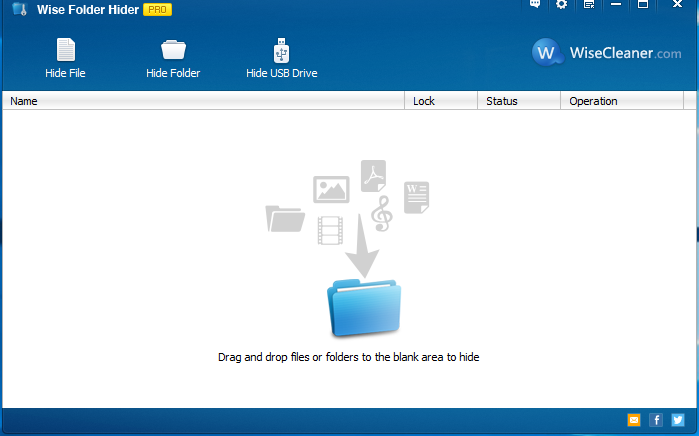
Wise Folder Hider Portable


Hide private files, photos, videos and other personal data from your PC.

Wise Folder Hider protects your private and important data from others’ eyes. This application is designed as a free USB drive/ file/ folder hiding tool. User can use it to hide sensitive or important files and folders on local partitions or removable devices. The data can’t be accessed by other programs or other operating systems such as DOS. The only way to access or unhide these data is to enter the valid password. However, Wise Folder Hider is designed for home use only, but not recommended for commercial settings which require stricter confidentiality. Using this application, your private data and important files will not be exposed to others or unintentionally revealed and your privacy will not be pried into if you share one computer, USB drive, removable HDD drive, etc.

Advanced Encryption Algorithm Protects Your Private Data from Priers
Wise Folder Hider Pro adopts advanced encryption algorithm, providing much more enhanced security than the free version for files and folders on your Windows PC. Wise Folder Hider Pro defends your private files from being found/read by a third-party tool.

Second Password Makes Your Hidden Files & Folders Double Secure
Wise Folder Hider Pro offers users an optional higher level of security. Users can set a second password for each of the files and folders hidden by Wise Folder Hider Pro. For those who have some real confidential files, they can rest assured knowing that their hidden files are double secured.

More Secure and Convenient to Modify protected files:
Different from other folder hiders, when it comes to modifying a hidden file or folder, users don’t have to unhide it, edit it, and then hide it again. A single click of the ‘Open’ button will open the hidden file or folder, so it becomes visible to you. Then you can edit or modify it like it has been unhidden. When you are done editing, close the program and the file or folder will become hidden again automatically, saving you extra steps. This amazing feature comes in handy when you hide some files that you use or edit frequently.

Context Menu Option & Super User-friendly Interface
The interface of Wise Folder Hider Pro is very intuitive. Even a first timer can get the hang of it in a minute. Better yet, while installing this program, an item called ‘Hide File/Folder with Wise Folder Hider’ is automatically added to the context menu. Users can hide files or folders by right-clicking them without launching Wise Folder Hider Pro.

Tuesday, August 15, 2017

Avidemux Portable


Avidemux is a free and open-source video editing program designed for video editing and video processing. It is written in C++, and uses either GTK+ or Qt for its user interface.

Avidemux is capable of non-linear video editing, applying visual effects (called "Filters") to video, and transcoding video into various formats. Some of the filters were ported from MPlayer and Avisynth. Avidemux can also insert audio streams into a video file (an action known as multiplexing or "muxing") or extract audio streams from video files (an action known as "demuxing").

Avidemux supports many formats, such as AVI, MP4, Matroska, MPEG-2, H.264 and H.265. It does not yet, or only partially supports modern open formats, like Opus, WebM, VP8, VP9 and AV1.

Avidemux has built-in subtitle processing, both for optical character recognition of DVD subtitles and for rendering hard subtitles. Avidemux supports various subtitle formats, including MicroDVD (.SUB), SubStation Alpha (.SSA), Advanced SubStation Alpha (.ASS) and SubRip (.SRT).

Multithreading has been implemented in the following areas of Avidemux (some partially through libavcodec):
  • Encoding
    • MPEG-1 and MPEG-2 (using libavcodec)
    • MPEG-4 Part 2 SP/ASP (using libavcodec or Xvid)
      • Earlier versions of Xvid are not compatible with this feature.
    • H.264/MPEG-4 Part 10 AVC (using x264)
    • H.265/HEVC (using x265)
  • Decoding
    • MPEG-1 and MPEG-2 (using libavcodec)
    • MPEG-4 Part 2 SP/ASP (using libavcodec)
-----

32bit version will run on a 64bit system.

More Info:
http://avidemux.sourceforge.net/

FileLocator Pro Portable


FileLocator Pro offers the most affordable way to exhaustively search your computer for all your important data. FileLocator Pro offers unique advanced features for digging out information in even the most obscure file formats. Find out why many Windows XP users are switching to FileLocator Pro today!

Whether it's a line of source code, an entry in a log file, a legal brief, or even just a Christmas letter to your family, FileLocator Pro helps you find things fast. Its unique features make it possible to dig out information in even the most obscure file formats.

Features:
  • Search using Boolean or Regular Expressions
  • Dual/Quad core processor support
  • Word, Excel and PDF searching
  • Open Office, Word Perfect searching through IFilter support
  • LAN/WAN network drives searching (UNC support)
  • Export search results in Text, CSV, HTML, XML, or a customized format using XSLT
  • ZIP, RAR, CAB, 7-Zip, ARJ, Bzip, CHM, CPIO, DEB, GZIP, ISO, LZH, NSIS, TAR archive searching
  • Active Scripting support for the ultimate in search customization
  • Shows surrounding lines of text
  • Customizable search environment
  • Built-in file viewer
  • Launch 3rd party editor at found line (inc. VS.NET)
  • Drag and drop support
  • Print preview
  • Search navigation to quickly browse previous search results
  • Integrates into Windows Shell
-----

Credits to PortableWares (Fuken Gruven) for original installer.


More Info:

Sunday, August 13, 2017

PilotEdit Portable


PilotEdit  is a capable text file editor that will easily edit large files.

PilotEdit supports the following file types; C, C++ Files, Java Files, HTML Files, XML Files, Oracle SQL Files, UNIX/Linux, Shell Files, JSP, TCL/TK Files, BAT files, PilotEdit Script, Javascript Files, PHP, ASP, Assembly, ASP.NET, CSS, Visual Basic, Perl, C#, Python, Ruby, XHTML Files, COBOL, AHK, Cript, Inno Setup Script, AutoIt Script, Pascal, CSV, Apache Pig Latin Script, VC++ Resource Files, Groovy, and REXX.

Features:

  • Edit huge files larger than 400GB (40 billion lines).
  • Compare and merge two huge files larger than 100GB (10 billion lines).
  • Code collapse.
  • Self-defined file types and key words high-lightening.
  • Input, delete, cut, copy and paste in HEX mode.
  • Column mode and Word wrap.
  • Endless undo/redo even after you switching between text mode and HEX mode.
  • Edit, download and upload huge FTP files.
  • Find/replace multiple-line text directly through regular expression.
  • Compare two directories.
  • Add a pre-defined string from string table by just one click.
  • Regular expression and multiple-line text support.
  • Define the frequently used regular expressions in script files and process files automatically.
  • File group enable you to open multiple files by just one click.
  • Find/replace in multiple directories.
  • Sort.
  • Find/remove duplicate lines.
  • Extract Strings by copying the target strings matching the regular expression into clipboard.
  • Text Formatting.
  • Edit, download and upload large files through SFTP.
  • Open huge files in quick mode.
  • Replace millions of strings in a huge file in quick mode.
  • Support UNICODE files and DOS/UNIX files.
  • Search in zip files.
  • Regular expression generator.
-----

More Info:
http://www.pilotedit.com

Download:

Saturday, August 12, 2017

PDF-XChange Viewer Pro Portable


PDF-XChange Viewer is a PDF editor/reader which allows you to view and edit PDF formatted documents.

PDF-XChange Viewer allows you to work with your documents both quickly and smoothly. You can skip pages, view documents in a number of layouts, and search to locate pages and keywords with ease. The applications toolbars are completely customizable with numerous configuration options.

-----

32bit version will run on a 64bit system

More Info:

Friday, August 11, 2017

SolSuite Solitaire Portable


SolSuite 2017 is a high-quality collection of 672 solitaire games.

All of the world's best-known solitaire games are here, including Spider solitaire, Klondike, FreeCell, Pyramid, Golf, Yukon, Monte Carlo, Canfield, Gaps, Forty Thieves, Four Seasons, Napoleon, Diplomat, La Belle Lucie, Flower Garden, Rouge et Noir. We've also invented dozens of solitaires with your fun in mind, such as King of Scotland, Foxtrot, Mayflower and many others!

SolSuite, a uniquely exciting gaming experience: hundreds of games to choose from, a dazzling selection of card faces & backs, large card sets for ease of viewing, ribbon interface for enhanced gameplay, skins to customize your playing area and fast, courteous support. SolSuite: it's addictively fun!


Features:

JZnw3e9.png
 672 world's best solitaire games!
JZnw3e9.png More than 80 awesome card sets!
JZnw3e9.png More than 300 beautiful card backs!
JZnw3e9.png More than 100 backgrounds!
JZnw3e9.png Large Card Sets easier to see!
JZnw3e9.png Many Themes to chose from!
JZnw3e9.png Lots of advanced features, options and statistics!

-----

Latest Graphics Pack Included.

More Info:

http://www.solsuite.com/

Thursday, August 10, 2017

WinToHDD Portable


Install, Reinstall, Clone Windows 10/8.1/8/7/vista without using a CD/DVD or USB drive!

  • • Reinstall Windows directly from ISO, WIM, ESD without using CD/DVD/USB.
  • • Install Windows onto a second hard drive directly from ISO, WIM, ESD without using CD/DVD/USB.
  • • Fully Compatible with GPT/UEFI.

-----


WinToUSB Portable


 WinToUSB is the best Windows To Go Maker that allows you to install and run Windows operating system on a USB hard drive or USB flash drive, using an ISO image or CD/DVD drive as the source of installation. Starting from version 2.0, you can clone current Windows OS installation (Windows 7 or later) to a USB drive as a Windows To Go Workspace. WinToUSB also supports creating a bootable WinPE USB drive, it can help you transfer the contents of WinPE to a USB drive and make the drive bootable.


WinToUSB's key features include
• Easy-to-use wizard interface that provides step-by-step instructions for creating a Windows To Go USB drive.
• Creation of Windows To Go from an ISO image file or CD/DVD drive.
• Clone an existing Windows OS (Windows 7 or later) to a USB Drive as a Windows To Go Workspace.
• Use of a Non-Enterprise Edition of Windows 10/8.1/8/7 to create Windows To Go Workspace.
• Creation of Windows To Go on Non•Certified Windows To Go USB Drive.

Extra features of the Enterprise Edition
• Clone current Windows OS (Enterprise edition of Windows 10/8.1/8/7) to a USB drive as a Windows To Go Workspace
• Clone current Windows OS which on a dynamic disk to a USB drive as a Windows To Go Workspace
• Clone current Windows OS which on a USB disk (Windows To Go USB drive) to other USB drives as a Windows To Go Workspace

Important notes
• Windows 7 is not completely portable. You may have driver problems when booting on different computers, so highly recommend using Windows 10/8.1/8 to create portable Windows.
• Windows 7 does not have built•in USB 3.0 support, so Windows 7 will have to be booted from a USB 2.0 port.
• The common USB flash drives are very slow. It takes a long time to install and run Windows from a common USB flash drive, highly recommend using a USB hard disk, a Windows To Go Certified Drives or a SanDisk Extreme CZ80 USB 3.0 Flash Drive to create portable Windows.
• Windows To Go drives can be booted on different computers, so you can carry it to anywhere and use it on any computer.
• You need to be an administrator on the computer you are installing the WinToUSB on.


Version 3.7 (8/8/2017)

    Add support for cloning Windows Embedded Standard 7 to USB drive
    Fixed bug: Failed to clone Windows which is on a VHD/VHDX disk
    Support for the latest version of Windows 10
    Dutch language support
    Fix other minor bugs


-----

Wednesday, August 9, 2017

Inkscape (incl. Ghostscript) Portable


Whether you are an illustrator, designer, web designer or just someone who needs to create some vector imagery, Inkscape is for you!

- Flexible drawing tools
- Broad file format compatibility
- Powerful text tool
- Bezier and spiro curves


-----

Ghostscript integrated in app.

32bit version will run on a 64bit system.

Flash Player Plugin Portable


Flash Player Plugins for portable browsers.

-----

Credits to Fuken Gruven (PortableWares) for original installer.

More Info:

https://www.adobe.com/au/software/flash/about/